
Plates, names & documents
Hide license plates, names, and documents in a photo.
Faces aren't the only thing that identifies someone. Brush over plates, name tags, house numbers, and paperwork with the Hide tool, using the same covers as faces, on your iPhone.
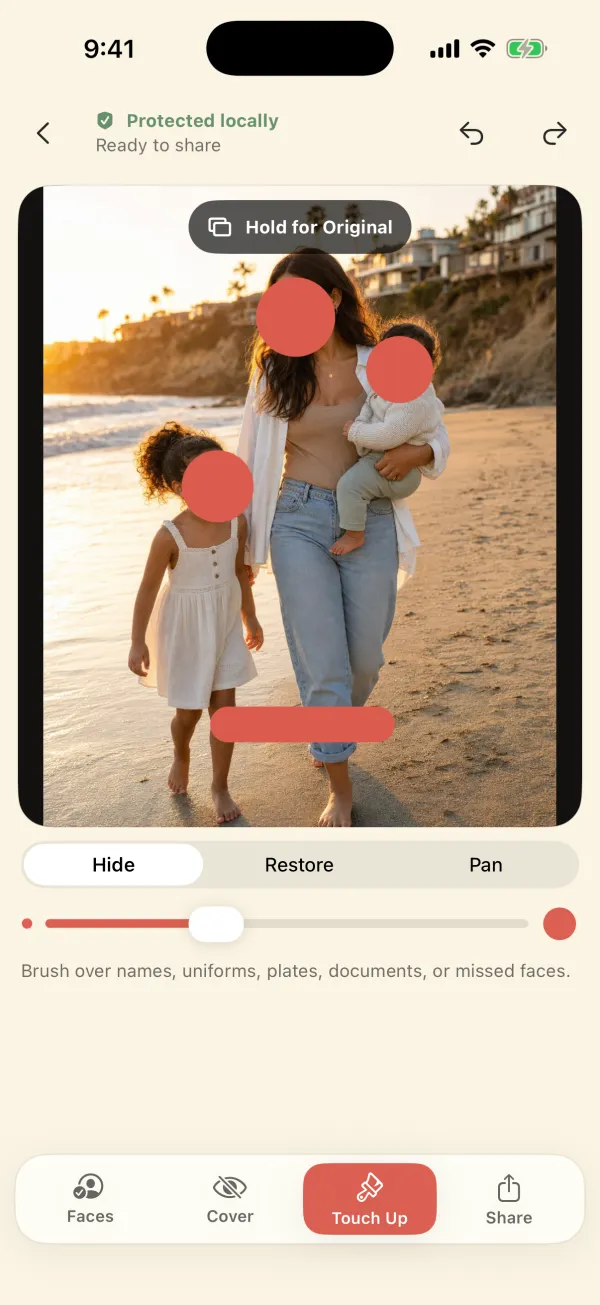
Short answer: in Blur Photo & Face Censor, open Touch Up, choose Hide, set the brush size, and paint over the plate or text. It gets the selected cover style. Restore fixes overspill. Plates and text are not detected automatically; only faces are. If you want automatic plate and text detection, Blurshot offers it (iOS 26 or later).
What to look for before you share
Do a slow scan of each corner, then the middle. The details that most often identify a family or a place:
- License plates on your car in the driveway, or other people's cars in the background
- Names on backpacks, lunch boxes, jerseys, cubbies, name tags, and birthday banners
- School identifiers such as logos on uniforms, signs at the entrance, and team names
- House numbers, street signs, and distinctive mailboxes
- Documents and screens: mail, report cards, tickets, badges, boarding passes, laptop and phone screens
- Reflections in windows, mirrors, sunglasses, and car paint
How to cover them
- Open the photo and handle faces first (tap to select, or Protect All).
- Switch to Touch Up and choose Hide. Adjust the brush size with the slider.
- Use Pan to move around the photo, and zoom in for small text. Paint slightly beyond the edges of the plate or text.
- If you covered too much, switch to Restore and paint it back. Undo and Redo are at the top.
- Choose the cover style. For text you want unreadable, use Privacy Cover. A light blur can leave large characters legible.
- Export the new copy and zoom in on the exported file before you share it.
A plate in the picture is visible information, so you have to cover it. GPS coordinates are hidden metadata, and the export drops them automatically. You need both. More on photo location data.
Is it okay to post a photo showing a license plate?
Plates are visible in public, but combined with a photo of your home, school pickup, or a regular spot they can link a car to a place and a family. Covering them is a cheap habit, especially for anything posted publicly or resold, like car listings or neighborhood groups.
Related: the four-corner background check.
Questions
Does the app detect license plates automatically?
No. Faces are detected automatically; plates, names, and documents are covered by painting with the Hide brush.
Can I black out text completely?
Yes. Privacy Cover is opaque, so painted text is fully covered in the exported image.
Does the cover stay on the exported image?
Yes. Edits are flattened into a newly encoded JPEG or PNG. There are no layers to remove.

Cover the details that give a photo away.
Blur Photo & Face Censor works on your iPhone or iPad, exports a new copy without location data, and never uploads your photos. $3.99 once, no subscription.